Webflow Pricing 2026: The Ultimate Guide to Plans and more
Webflow pricing guide for 2026: Compare Site and Workspace plans, explore new Add-ons, and learn how Liquiflow helps you avoid high hosting fees.


Understanding Webflow’s pricing in 2026 requires looking past the simple monthly fee. While it is marketed as an all-in-one solution, the platform uses a tiered system that can quickly become a significant overhead as your brand scales. To avoid overpaying, you must distinguish between what you need to build the site and what you need to keep it live.
1. The Workspace vs. Site Plan Logic
The first layer of confusion for most users is the separation between "Workspace" and "Site" plans. These are two distinct billing cycles that serve different purposes.
Workspace Plans (The Team Engine): A Workspace plan is essentially an "account" fee. It controls how many people can collaborate on a project and how many unhosted sites (staged sites on a .webflow.io domain) you can have.
- Starter (Free): Ideal for learning. You can build up to two staged sites, but you cannot invite teammates or export code.
- Core ($19/mo billed annually): This is the entry point for professionals. It allows you to manage up to 10 projects and, crucially, unlocks the Code Export feature. If you want to design in Webflow but host your static site elsewhere, this is the minimum requirement.
- Agency ($35/mo billed annually): For teams managing high volumes of client work. It offers unlimited unhosted projects and advanced staging permissions.
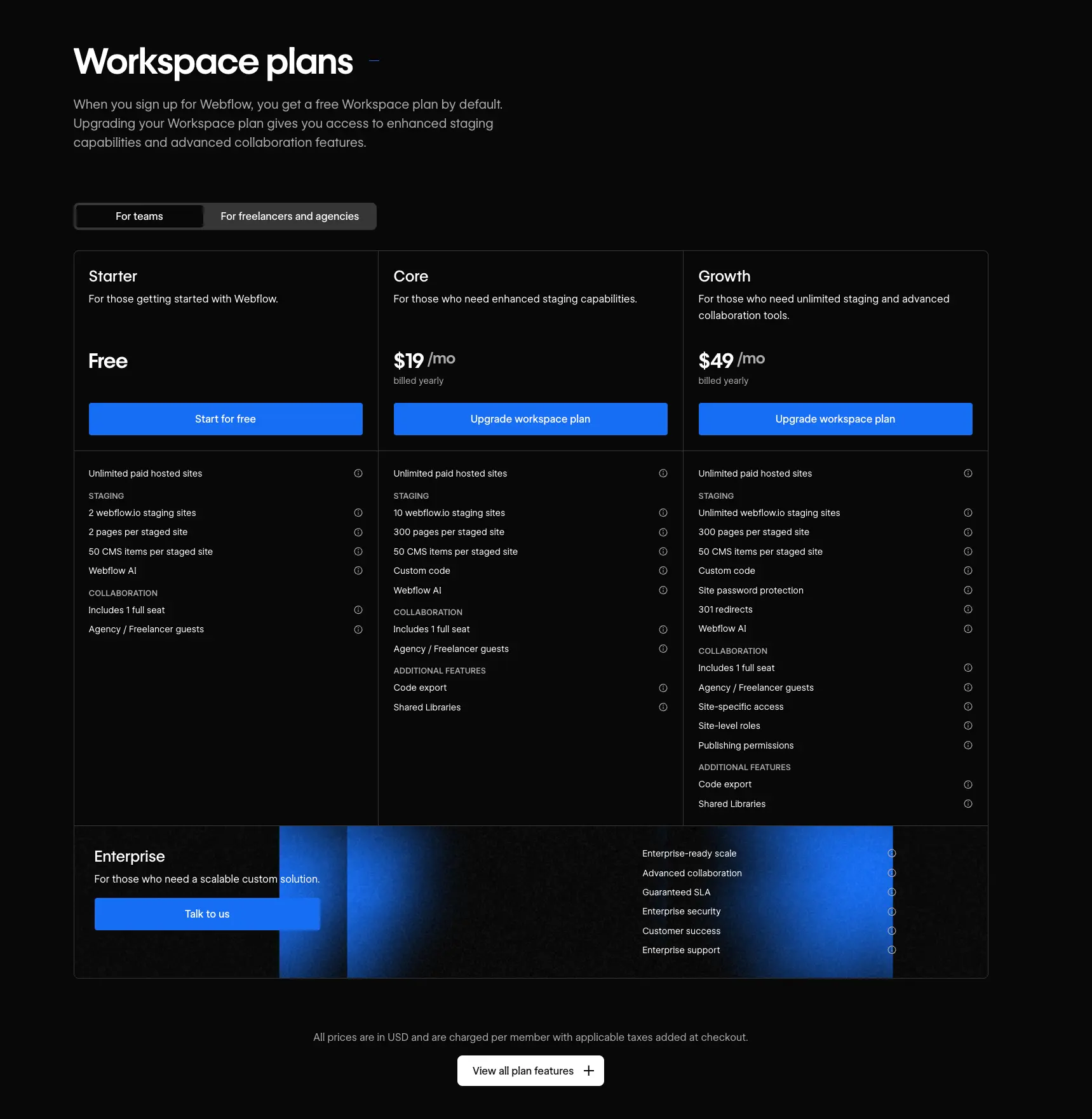
Site Plans (The Hosting Engine): While a Workspace plan lets you build, a Site Plan is what lets you connect a custom domain. You must pay for a Site Plan for every individual website you want to go live. In 2026, the bandwidth limits on these plans are the primary cost driver.
2. General Hosting Tiers and Bandwidth Caps
Webflow shifted its model to be more usage-based, which means "cheap" hosting is a thing of the past for sites with even moderate traffic.
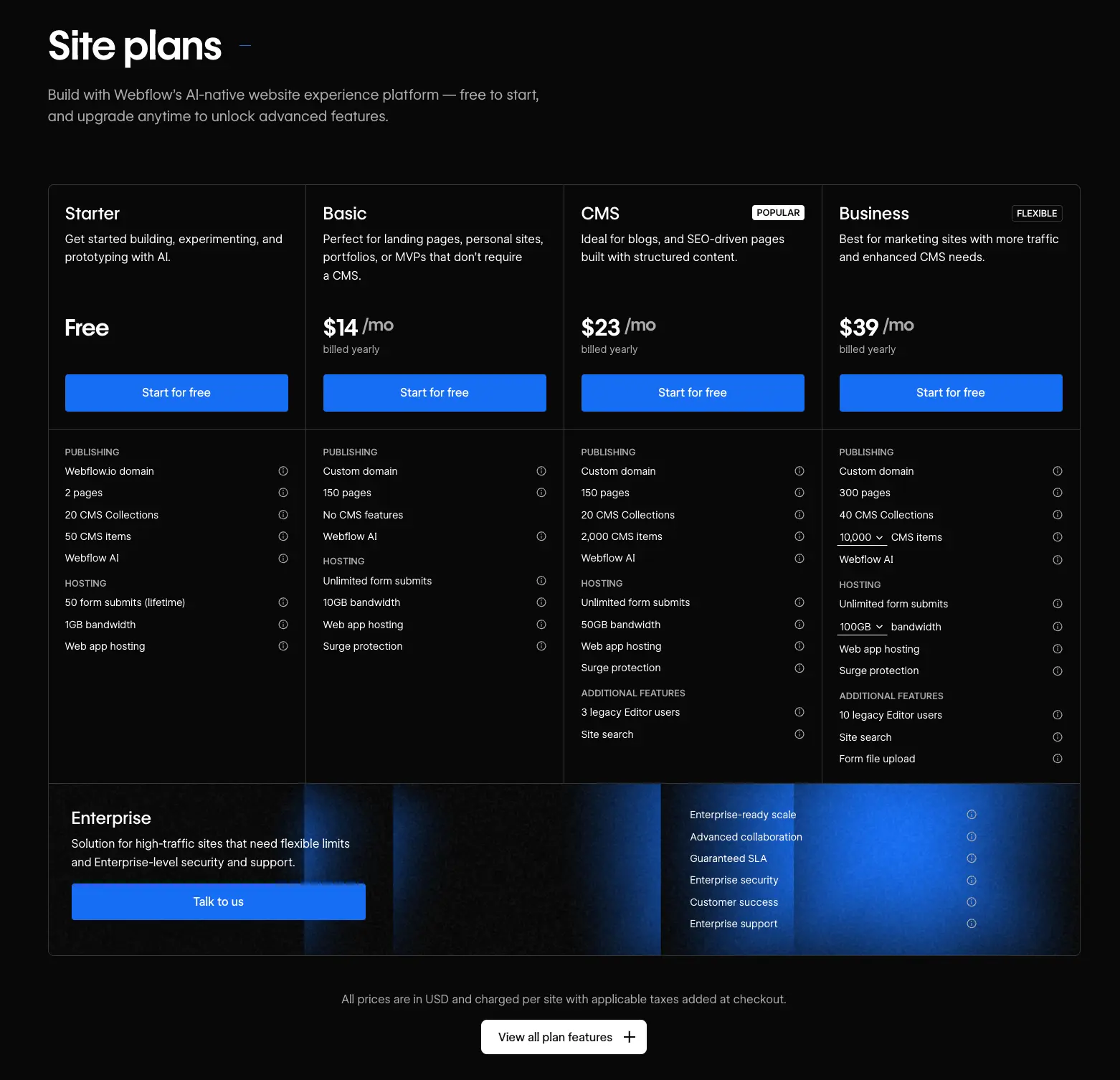
- Basic ($14/mo billed annually): This is intended for simple landing pages. It does not include a CMS, meaning you cannot have a blog or dynamic content. The biggest limitation is the 10GB bandwidth cap, which can easily be exhausted if your site uses high-quality images or video.
- CMS ($23/mo billed annually): The standard choice for most business sites. It allows for 2,000 CMS items and increases your bandwidth to 50GB. For most blogs and portfolios, this is the "safe" zone.
- Business ($39/mo billed annually): Designed for marketing sites that get significant traction. It offers 10,000 CMS items and 100GB of bandwidth.
3. The Hidden Cost of Webflow Add-ons
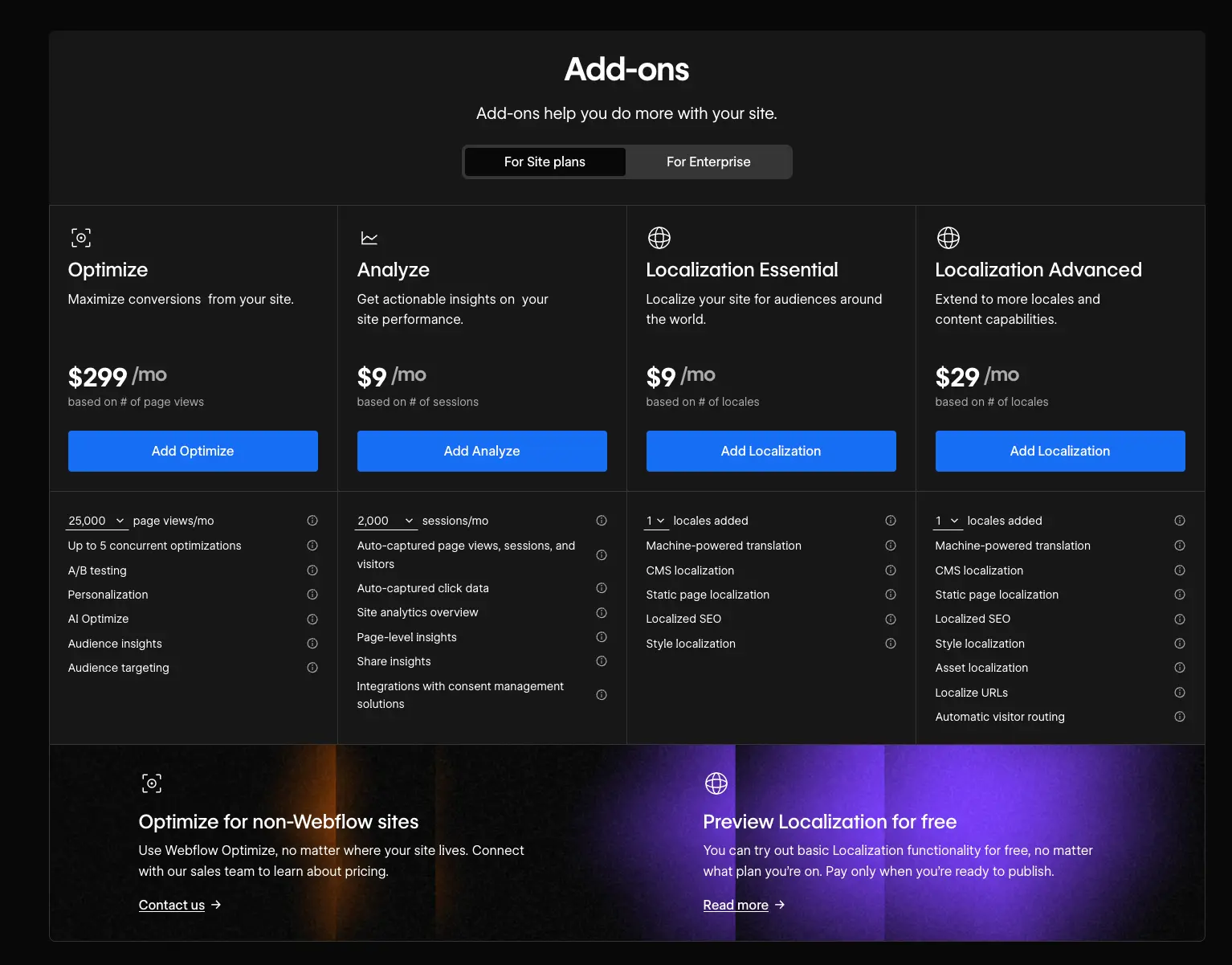
In 2026, Webflow has leaned heavily into "Add-ons." These are modular features that you pay for on top of your existing Site Plan.
Localization: Scaling Globally: If you want your site to be available in multiple languages, you can no longer just "duplicate pages."
- Localization Essential ($9/mo per locale): Good for up to 3 locales. It includes machine translation and basic SEO localization.
- Localization Advanced ($29/mo per locale): Supports up to 10 locales and allows for "Asset Localization," meaning you can show different images or videos to different regions.
Optimize and Analyze
- Analyze ($9/mo): Provides privacy-friendly, cookieless analytics directly in your dashboard. It avoids the complexity of setting up third-party tools but adds a recurring cost.
- Optimize (Starting at $299/mo): This is a high-end tool for A/B testing and AI-driven personalization. It is powerful for conversion optimization but is priced for enterprise-level budgets.
4. The "Success Tax": When Webflow Gets Expensive
The biggest trap in Webflow pricing is the Surge Protection and overage model. Webflow monitors your bandwidth and visitor count. If you exceed your plan’s limits for two consecutive months, the platform will automatically upgrade you to the next tier.
For a high-traffic site, this "success tax" can be brutal. If your site goes viral or you run heavy ad campaigns, you might find yourself pushed into a Business plan or forced to buy additional bandwidth "chunks" (e.g., +50GB for $30/mo). For a site pulling in 100,000+ visitors, hosting costs alone can climb into the hundreds of dollars—money that could be better spent on marketing or inventory.
5. Why the "Hybrid" Approach is the Professional Move
Webflow is arguably the best design tool on the market, but its e-commerce and high-traffic hosting are not where it shines. Webflow's e-commerce plans are expensive (starting at $29/mo + a 2% transaction fee) and lack the deep inventory and fulfillment features of a dedicated platform.
If you love the design freedom of Webflow but want to avoid the high hosting fees and limited commerce tools, you should look into Liquiflow.
Liquiflow allows you to use Webflow as your "Visual Builder" but host the actual store on Shopify. This transition solves the two biggest Webflow pain points:
- Eliminate Bandwidth Anxiety: Shopify doesn't charge you based on how many people visit your site or how many images you upload. Your hosting costs remain predictable.
- Superior E-commerce Infrastructure: By converting your Webflow design into a native Shopify theme with Liquiflow, you gain access to Shopify's world-class checkout, massive app ecosystem, and better transaction rates.
The bottom line for 2026 is simple: Use Webflow for what it’s best at, design, and use a platform like Shopify for what it’s best at, selling and scaling. If you are starting to feel the weight of Webflow's hosting costs or the limitations of their e-commerce features, using Liquiflow to bridge the two is the most cost-effective way to run a high-performance brand.