How to improve SEO on Shopify: Expert Guide
Master Shopify SEO optimization with these expert SEO best practices. Learn to fix Core Web Vitals, implement Schema, optimize site structure, and eliminate page builder bloat for maximum organic rankings.

I have audited and optimized hundreds of Shopify stores. The pattern is consistently the same: store owners focus 90% of their energy on design and ads, and leave SEO to a few generic apps. The result? Beautiful stores that are technically invisible to Google. Shopify is a robust platform, but "out of the box," it is rarely optimized for highly competitive search landscapes. To dominate rankings today, you cannot rely on basics. You need a technical framework. Something that you always do when building new Shops. Here are my Shopify SEO best practices:
When I take over a store's SEO strategy, I don't guess. I implement a strict protocol (you know theses protocols when they fly planes, something likes that). Here is the detailed breakdown of the steps I take to maximize Shopify SEO performance.
1. Ruthless Page Speed Optimization (Core Web Vitals)
Google has made it clear: they hate slow pages. If your mobile site takes more than 3 seconds to load, you aren't just losing customers, you are losing crawl budget and ranking potential. "But Nikes Website has a Page Speed of 1/100." You are NOT Nike, you need to optimize your site otherwise you will be hit with SEO penalties.
My first step is always optimizing the Critical Rendering Path. I focus on these specific metrics:
- Image Dimensions & Weight: This is the most common error. I enforce a strict rule: no image should ever be wider than 2000px (even for hero banners). More importantly, the file size must be under 200kb. Yes, I prefer a slightly blurry image over massive render delays.
- Next-Gen Formats: JPEGs and PNGs are outdated for the web. I ensure all images are served in optimized formats like WebP or AVIF, which offer superior compression without quality loss. The cool thing with WebP is that you can even have transparency with images.
- GIFS: Dont even think about it. What you can use instead are animated WebPs. They work like Gifs, but are a lot smaller.
- Above the Fold: You cannot lazy-load everything. The main header image (LCP element) needs to load instantly. I manually add
fetchpriority="high"to the hero image and ensure it is eager loaded in the header. Everything else, images below the fold, must be lazy-loaded. Eager loading means, that the browser directly loads the image when visiting the page, not only when it comes into Viewport. - JavaScript Management: JavaScript is the heaviest resource for a browser to parse. I audit all scripts. If a script isn't required for the initial paint, it must be deferred or loaded async. I aggressively reduce external scripts to the absolute minimum. Libraries like SwiperJS and so on are fine, but please defer load them, that is super important.
- Lighthouse: Please use Lighthouse to optimize for this stuff, its directly built into your browser. You should not be satisfied with a score <90 for Desktop. I try to tackle every issue that comes up.
2. Perfecting Semantic HTML Structure
Google is a machine. It relies on the HTML structure to understand the context and hierarchy of your content. If your heading tags are used for styling rather than structure, you are confusing the crawler.
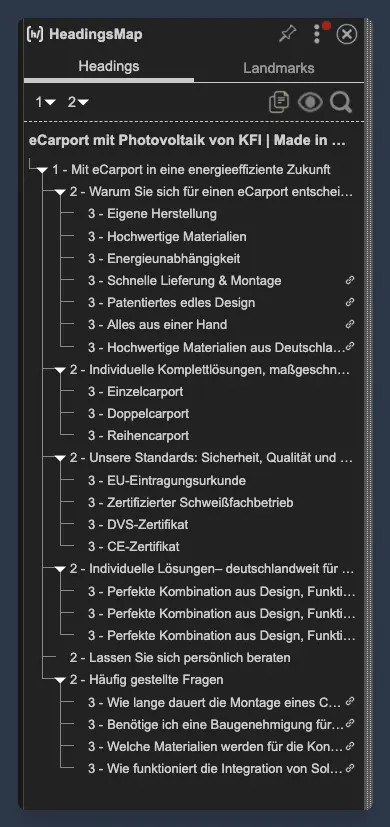
My Protocol for Heading Hierarchy: I strictly follow the H1-H2-H3 structure.
- H1: There can only be one H1 per page. It must contain the primary keyword for that URL.
- H2: These are your main chapters.
- H3: These are sub-points within the chapters.
- No Skipping: I never skip levels (e.g., jumping from H1 to H4) just to adjust a font size. This breaks the document outline. Please dont do that. You can keep the Html Tag and instead change the class.
- Dont guess: Sometimes themes mistakenly tag "Cart" or "Menu" as Heading Tags, which destroys your relevance. I use the HeadingsMap Chrome Extension to visualize the structure and spot errors immediately.
- Focus on one thing: I see a lot of pages where they try to rank for 10 different keywords on a landingpage. That doesnt work. It needs to be 1 MAXIMUM 2 specific Keywords that your Landingpage is about.
Semantic Tags: Beyond headings, the code layout matters. I ensure the core content of the page is wrapped in a <main> tag. Inside that, every distinct content block is wrapped in a <section> tag. This helps search engines differentiate between your main content, your header, and your footer.
The Header should be a Heading Tag, Nav should be Nav Tag and Footer should be a Footer tag.
3. The Hidden Performance Killer: Eliminating Junk Code
This is the most critical technical insight in this guide.
Many store owners, desperate for design freedom, install drag-and-drop "section builders" like PageFly, GemPages, EComposer, Shogun, or Replo.
While these tools look nice in the editor, they are disastrous for SEO optimization. They work by injecting massive amounts of bloated JavaScript and God knows what. This "junk code" drastically increases the DOM size and slows down the browser's main thread. I have seen reviews and live data where stores lost significant traffic immediately after installing these builders. This was mentioned a lot by users that complained about these builders.
The Expert Solution: Liquifow
To achieve elite SEO scores, we must avoid this bloat. This is why we have built Liquifow.
Liquifow allows you to take high-end designs (specifically from Webflow) and convert them to Shopify, but with a crucial difference: It generates pure code.
- No Heavy JS: Unlike the section builders mentioned above, Liquifow does not rely on heavy JavaScript libraries to render content.
- Native Performance: It utilizes standard HTML, CSS, and Shopify's native Liquid code.
By using Liquifow, we get the design flexibility of a page builder without the SEO penalty. It keeps the page lightweight and the code semantic. If you want to rank, you have to stop using tools that generate junk code.
4. Advanced Structured Data (Schema Markup)
You cannot wait for Google to figure out your product data. You have to spoon-feed it to them using JSON-LD Schema.
The Schema Implementation Checklist:
- Product Schema: Every product page must have comprehensive schema including:
Name,Description,Image,SKU,Brand, andOffers(Price, Currency, Availability). - AggregateRating: This is vital. It pulls your review stars into the search results, which drastically improves Click-Through Rate (CTR).
- Organization Schema: On the homepage, I add schema regarding the company (Logo, Contact Point, SameAs social links) to establish Entity Authority.
Its very easy to add product schema, just this script on product pages:
<script type="application/ld+json">
  {{ product | structured_data }}
</script>
If you care about SEO then this script is a no brainer to have.
5. Metadata and Descriptive Alt Text
These are the fundamentals, but they require precision.
- Title Tags & Meta Descriptions: These are your first point of contact with a searcher. I ensure the Title Tag leads with the main keyword. The Meta Description is written to sell the click, it acts as ad copy.
- Image Alt Text: I never leave this blank. Alt text serves two purposes: accessibility for screen readers and context for Google Images. I write descriptive, natural sentences. Instead of just "chair," I write "Modern mid-century dining chair in oak wood."
6. Internal Site Authority and Link Hygiene
SEO isn't just about external backlinks, it's also about how authority flows inside your store.
- Zero 404s: An internal link pointing to a 404 page is a leak in your SEO tank. It wastes crawl budget and frustrates users. I regularly scan the site to ensure zero internal 404 links exist. You can use tools like Ahrefs for Weekly reports and I have all my websites delivering me a report and I check them in detail.
- Page Relevance Linking: Not all products are equal. I identify the highest-margin or "hero" products and artificially increase their Page Relevance. I do this by linking to them more frequently from the homepage, blog posts, and other high-traffic collections. This signals to Google that this specific product is the most important page on the topic.
7. The Duplicate Content Trap: Canonical Tags
By default, Shopify creates two URLs for the same product:
/products/black-tshirt(The Canonical URL)/collections/mens/products/black-tshirt(The Duplicate)
If you link to the collection-aware version internally, you are splitting your ranking power between two URLs. I ensure that my theme code is edited so that all internal links point to the Canonical URL (the root /products/ path). This consolidates all your SEO authority onto one single, powerful URL.
8. Future-Proofing with llms.txt
Search is changing. With the rise of AI-driven search engines (like SearchGPT, Perplexity, and Google's AI Overviews), we need to speak to Large Language Models (LLMs).
I now implement an llms.txt file in the root directory of the shop. This file gives specific instructions to AI crawlers on how to read and interpret the store's content. It ensures that when an AI summarizes your brand or products, it has the correct, structured information to give the user.
Summary
Shopify SEO optimization is an ecosystem of connected parts. It requires a commitment to speed, clean code, and logical structure. Following technical standards is more important than ever, you build a store that doesn't just look good, it ranks and in the end SELLS.